Showing posts with label self publishing. Show all posts

Friday, April 27, 2012

State of the Printed Page (a recap)

This turned out a little bleaker than I had intended. Lots on my mind these days, which is coming out in my writing. I'll be decompressed in about three weeks and back to my usual, flippant self by then.

typecast 20120427

If you'd like to join up at AW, you can find me under the exceptionally non-creative handle "mpclemens" Like any Internet forum, there are strong personalities, meandering conversations, the occasional flamewar breakout, and other digressions. There's also excellent sources of information like this FAQ on agents, representation, and getting published in the trades, which has been something of a cold, wet washcloth of reality applied to my pride. This is not a bad thing.

In all, I see Quest as a baby step: whether it will lead to other things, and how high I can potentially climb is up to me.

And Duffy, if it weren't for you, I wouldn't have gotten suckered into finding a typewriter for NaNoWriMo, which led me to Strikethru and Fresh Ribbon, and the Brigade, and so on. In short, it's all your fault.

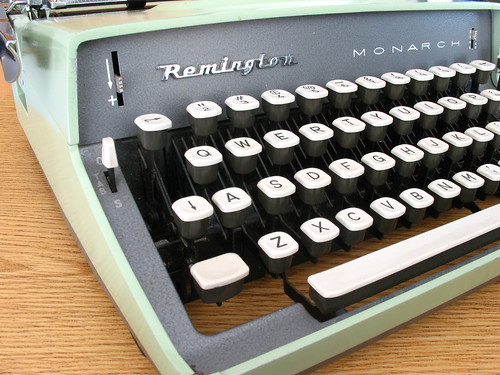
Typed on a Remington Monarch
Remington Monarch, c1963

Friday, March 30, 2012

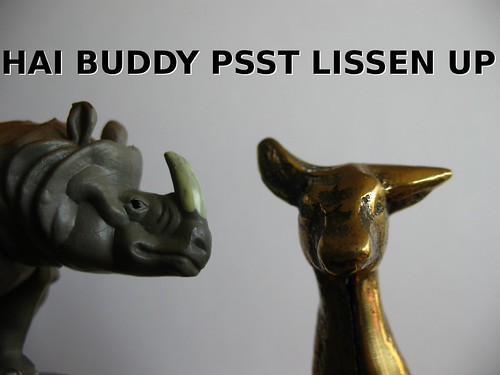
The Rhino Isn't Fooling

Nano Rhino whisper secrets

Just a quick post to advise everyone that I've uploaded the latest, way-fewer-errors version of One Last Quest to the various e-book retailers out there.

If you're a tightwad watching your budget, there are two lower-cost options for you:
  1. Amazon, being Amazon, has gleefully undercut my retail price by 50%. Take that, indie author!
  2. I've made a new coupon code YF46K which applies only to Smashwords downloads and brings the price of Quest right on down to a frosty-cool 99 cents. If you previously downloaded a copy, you should be able to get the updated version for free by logging back in and downloading the latest-greatest.
And also for you, my lovely fellow Luddites, I am pleased to announce that a print edition is available from CreateSpace. If you enjoy words and seeing them together on a page, then you will certainly enjoy this book. Look! It has a bar code and everything. That means it's real. It is also a convenient size for stowing in a backpack, bag, or for leveling out that wobbly coffeeshop table. You know the one. It's that table in the corner that nobody sits at because, you know, teh wobblez.

If you've bought or downloaded a copy, I thank you all the way down to your toes. Once you've read it, perhaps you could take a moment to leave a review at the retailer's site? Then I'd thank the rest of you even more.

Wednesday, March 7, 2012

Lordy Lordy

Clearly, free is everyone's favorite four letter word. Smashwords sends me an email every time someone buys a copy of One Last Quest, and I've been watching with great glee as a new message pops into the mailbox about every hour over the last few days, ever since that freebie coupon code took effect. Right now, the magic "copies sold" number is 40 -- three copies actually sold-for-money sold, and another thirty seven downloaded since the coupon took effect.

Does this mean my readership is a bunch of cheap bastards? YES. And I love you all for it.

So to celebrate the midpoint of the week of freeness, here's the promised "lessons learned" post.

Picking a Distributor

Smashwords

I was already familiar with Smashwords, and I liked how their aptly-named "meatgrinder" software churns out multiple electronic files from a single, carefully-formatted upload. Their royalties are generous, even on a cheap book like mine, and frankly, I kind of like the "everybody in all together" attitude of the site. Yes, there's a lot of pr0n-ish vampire novels about, and it's easy to get swallowed up in the noise. Direct-linking to the book is way more effective than trying to chance across it on their site.

Pros:

Free, all the way through. Multiple file formats and distribution channels, including one just-announced channel that can feed into libraries. Once a customer buys a book, they have access to all revisions of that book, so you don't need to feel guilty about fixing up typos (ahem.) ISBN assignment is free and easily done, and you use the same electronic ISBN in all the other places you might want to upload your book.

Cons:

Approval for the distribution process to other retailers like Apple and Sony is slow -- I've been waiting two weeks, which seems to be the minimum, and I'm about to update the file with a new corrected copy. Does this restart the approval process? I don't know. Very little hand-holding in the process: this is a DIY operation, and formatting your manuscript according to their rules is fiddly.

Bonus Pro:

The Smashwords style guide is so particular that the resulting document can serve as the foundation for other distributors with just a few changes to the styles.

Amazon

The 800-pound gorilla in the room: ignore it at your own risk. Amazon's attitude towards traditional book publishing houses seems to always be making news, and I can certainly see how a huge operation with no brick-and-mortar presence wants to shift the world to electronic downloads: it makes great business sense.

It's rather hard to track down, but Amazon has the Kindle Direct Publishing system, which is very Smashwords-esque. You upload a formatted Word document and a cover image, there's a vetting process, you set the price and rights, and after a waiting period, your book shows up as a Kindle download, and is available through Amazon's various international incarnations as well (they handle the currency conversion.)

Amazon is making a big push for their "KDP Select" program, which sounds too good to be true, and thus probably is. The most glaring issue I have with this program is that you sign over exclusive distribution rights to Amazon for your work for 90 days. No selling it anywhere else, at all. This felt like a Bad Deal to me, so I opted out (though it's presented to you each time you log in to check reports.) Mr. Speegle opted to go this route with Pen & Platen and I'm sure that his recent rise to the top of the Anthology chart was helped by the Amazonian marketing muscle that accompanies this program.

Anyhow, the Amazon upload format is practically the same as Smashwords: add page breaks before your chapters, replace "Smashwords edition" with "Amazon edition" and you're about done. Prepping a file for upload is easy.

Amazon has two royalty levels, 35% and 70%. What right-thinking individual wouldn't choose 70%? Me, of course. It's a very confusing page -- possibly by design -- and my natural skepticism tells me that Amazon isn't giving you 70% of the book price without you giving up something else in turn. It seems to hinge around "delivery costs," which baffles me for an ebook in this era of unlimited-bandwidth cell phone plans. Short version: seems scary, and I don't like the scary.

Pros:

Very organized. Upload is a snap after Smashwords. Who hasn't heard of Amazon? "Kindle" is becoming synonymous with "e-reader" (even though the Nook is better!)

Cons:

KDP Select narrows your distribution options, and may involve signing over firstborn or selling soul.

Barnes & Noble

If the KDP program was hard to find, B&N's PubIt! program was nigh impossible. It's referenced in numerous places in their discussion boards, but I had a hard time tracking it down short of a web search to find the signup page. I have a Nook reader from B&N and certainly feel brand loyalty in distributing through them. Also, I'd still be waiting on Smashwords to distribute to B&N, so uploading my own file made the most sense to me.

Sales here are on par with Amazon, honestly. I'm going to experiment with the coupon systems on each and see what happens. There are a number of price-harvesting services that scan the major sellers and look for price drops/coupons: I wouldn't be sad to be picked up by those.

Pros:

Equally organized. Upload is also trivial after Smashwords. Maybe the only domestic competition left for Amazon.

Cons:

Is not Amazon.

A Word About DRM

That's "digital rights management" to you, or "the reason you can't share an ebook with a buddy, or read that file you already bought for your Kindle/Nook/Kobo on your computer." In other words: the way your file is encrypted to ensure that it is read only by the paying customer. All distributors will ask you what approach to DRM you want to take, and once you've chosen it for a book, there's no going back short of scrapping the old one and uploading a new one.

To soapbox for a moment, I think DRM is a very, very, very bad idea. It's as secure as any encryption scheme meant to protect paying customers from their own base instincts, which is to say, not at all. DRM makes no distinction between sharing a copy with yourself on another reader and sharing a thousand copies with your friends. I think DRM primarily serves the companies that make the reading devices and the encryption software. Why assume your customers are thieves?

I just started reading Twain's Roughing It on el Nook the other day, and am enjoying it immensely. I can do this because 1) the title is in the public domain, and is thus available from Project Gutenberg and 2) it's available in a variety of DRM-free formats, including one that my Nook reads (the common .epub format.) If my descendents 100 years from now are reading -- and they damn well better be -- I'd like them to be able to look up great-great-great-great grandpa's silly little adventure book and not suffer the same puzzlement that my kids do when I show them an 8-track tape at the thrift store. "Dead format kids, sorry. Your introduction to Herb Alpert will have to wait for another day."

As an writer -- and I think I can call myself that now -- I'm sure that I'm robbing myself of... something. Money? Eh, I'm not going to get rich on a $1.49 piece of amateur fiction. Credibility? Any hope I had of that was gone a long time ago. Honestly, I don't see how anyone's needs are met by DRM here. I want a broad audience, and I want them to read, dammit. If one of them happens to pass my book along to 150 friends, that would be 150 more potential readers.

DRM BAAAAD. READERS GOOOOD.

OK, off the soapbox.

Getting In Print

Thanks to their affiliation with NaNoWriMo, I'm pretty solidly in the CreateSpace camp for making a print-on-demand copy of my book. They usually offer a coupon or special code to NaNo winners which, being cheap, I'm happy to exploit. (Last year was a free proof copy. This year is five free "real" copies.) CreateSpace is also an Amazon company, so you get to leverage that connection or feel icky about it, depending again on your opinion of Amazon. If you're overcome by the ickies, I'd check out Lulu, which seems to be the other big player in this arena within the United States. Both seem to be free, until you start ordering things (proof copies, a copy for mom) or want to take advantage of their professional services (cover design, editing, interior layout, etc..)

One Last Quest is very much a labor of love as well as a grand DIY learning experience: it's a "firsts" book for me. First book worth reading (IMHO.) First book transcribed and edited. First book I let other people read. First book sold. Might as well get another "first" under my belt, right? Besides, there is nothing, nothing so electrifying as holding a physical copy of a book with your name on the outside and your words on the inside. (OK, maybe holding your newborn children wins out there. But they don't come with your own ISBN number, either.)

Print is a different beast, but again I started with my Smashwords digital file, and tweaked a copy for Createspace. Intra-document links went away, obviously, and I added some art to the interior that I omitted from the digital editions. Measurements are critical here, and it took a while to get my word processing program to format the PDF exactly right; wide margins on the inside, and narrow ones elsewhere; page numbers in the outside corners; and getting the front- and back-matter (title page, copyright, about the author) to look correct.

Still: oh, that electrifying proof copy. And oh! The typos. Lesson for next time: don't be so cheap, and get a pre-proof version run off at the copy center. I'm finding far more mistakes on the printed page than I am on-screen.

Preparing for print is a lot more fiddly than ebook preparation. Upload the file, and then wait 24-48 hours for approval (and reports of issues.) Upload or design a cover, and then wait another 24-48 hours for approval. Order a proof (recommended), wait for delivery. If there are fixes, start over. It's a game for the patient, and I'm not a patient person.

One last tidbit: hyphenation and justification. You'd think that a typewriter person would have been aware of this, but no. This is something I honestly don't pay attention to in books that I own, but the right edge of my proof copy seems very ragged to me. I need to review some of my commercial print books at home and see if they are set in a justified width, and have hyphenation. I suspect that they do.

Pros:

If you come in prepared, it's easy, but it's still like air travel: lots of hurry-up-and-wait. The "cover calculator" tool gives you a handy template that shows exactly where to place your art -- and where not to -- based on the page count and size of your book. I tried to do this by hand: never again.

Cons:

What-you-see isn't necessarily what-you-get. I cycled through about four cover designs, with layers and textures and so on, and after approval, discovered that the layers didn't, and the textures weren't, and so forth. Simple, flattened designs like the one Rob Bowker made for Pen & Platen are going to give you the fewest surprises. The default covers look default, like PowerPoint slides. Lulu's defaults appear no different.

Pay extra attention to options in your PDF-generating software that talk about "true registration." I spent a couple of days wondering how my text could bleed into margins that I'd clearly set up. This is buried in the paragraph style section in LibreOffice, and it magically fixed the problem.

Shameless Promotion

Ah, I bet you think this section is going to be chock-a-block full of self-deprecating wisdom, don't you?

Bad news.

Honestly, this is the part I'm struggling with the most. Within minutes of getting the "all clear" email from Smashwords, my first inclination was "I need to tell everyone about this" followed immediately by "I wonder if it would be a bad thing to send this everyone on my contact list?" It's a dark day when you suddenly find yourself sympathizing with pill spammers and secret-shopper fraud mailers.

The great thing about self-publishing is that anyone can do it. The bad thing about self-publishing is it appears that everyone is doing it, and except for a few wild outliers (who we hate in public and envy in private) there's not a lot of immediate gratification for the indie author. Forty sales! Well, forty downloads, in the guise of a sale. So what do you do?

I'm blogging about it here, obviously, and I set up a new "books" page here on the blog just to point to the available work, and to start teasing about the next one in the pipeline. I've been known to drop non-subtle hints on the various social media outlets (free book! free book!), and would encourage any readers to pop in to the site where they got the book and leave a review.

In the meantime I keep reloading my "dashboard" page and checking email for that magic message...

*doink*

41 copies! I could get used to this feeling.

Sunday, March 4, 2012

IZ IN YR BLOG POSTIN TEH KOOPONZ

Nano Rhino whisper secrets

PSST BUDDY

YOU WIT TEH EARZ

OH HAI!

DID U NO ITZ READ EBOOK WEEK?

ME NEEDER! LOL

DID U NO U CAN HAS A FREE EBOOK?

DID U?

U CANZ!

THIS BOOK LULZY, I LOL UNTIL I POOPZ

NOW YOU GETZ IT FREE DIS WEEK WIT TEH KOOPONZ RE100

YES! U CAN HAZ FREE LULZ EBOOK WIT RE100

MABE U RITES THAT DOWN NOW, K?

RE100

ONLY GUD UNTIL MARCH 10

WHAZZAT?

U MADE OF BRASS?

U NO CAN MOVEZ ARMZ?

U NO CAN READ?

THEN Y WAYSTIN TIME TALKZ WITH U?

LETZ KEEP DIS A SEKRIT, K BRO?


Thursday, March 1, 2012

On Lambs and Lions

20120301 typecast

Well of course I'm going to link to the book. E-book editions are currently:
Smashwords will also distribute to Apple, Kobo and Sony, but I'm in the hurry-up-and-wait stage for that. Ditto for the printed proof copy of the book, which will make its way to me in about a week and a half. I'll do a massive recap post when I can breathe again.

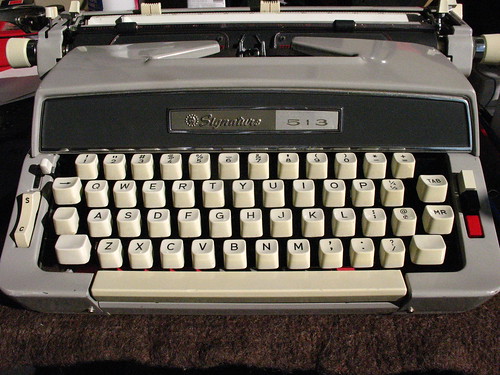
Typed -- courageously -- on the Brother/Montgomery Wards Signature 513:
Montgomery Ward Signature 513 (Brother), c.1966

Thursday, February 23, 2012

Cover Me

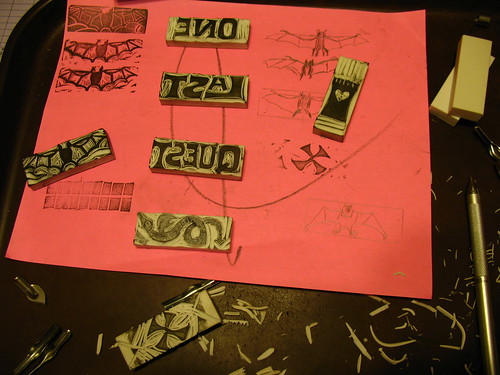
Here's some exciting(?) in-progress shots of the cover art for One Last Quest showing my process, such as it is.

Step 1: Sketching

Cover Art: The Carvening

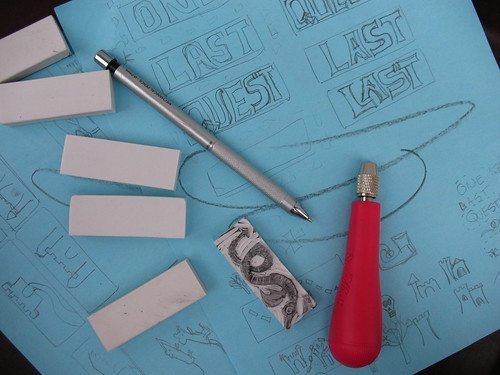
These erasers are pretty small, around 2 1/2 inches on the long side, and about 3/4 of an inch across the short edge. I say "around" and "about" since these came from the dollar store, and are not exactly manufactured to precision specs. The small size is an asset, though, since it forced me to think about what I could accomplish in a small space with my limited art abilities.

I trace out a bunch of rectangles on paper from the erasers, and then spent some time fiddling around with the letters shapes. Since this is a cover for an e-book, I wanted to make sure whatever I made was bold and would show up well when reduced to a thumbnail size. You can see my doodles on the blue paper behind these erasers. I was still trying to figure out what to do with the word "LAST" here, since I didn't like the big gap between the "L" and the "A" but there's not a lot of room to tinker around.

Step 2: Transfer

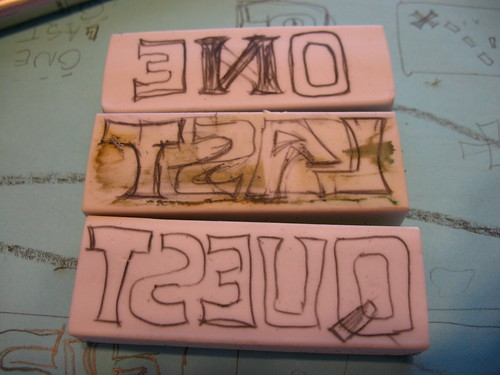
Initial drawings

To transfer the image, I placed the blank eraser next to the drawing and then copied a mirror image over. This process was fraught with peril, since my brain kept helpfully "fixing" things as a drew: note the remnants of the "N" in the word "ONE" and the fact that "LAST" was actually erased because I'd done the "L" and "S" the wrong-way around. Voluntary dyslexia is difficult, people.

Only later in the day did I realize that you could press a blank eraser against a heavy pencil drawing and enough of the graphite would transfer over to give me a reference point to recreate the drawings. Duh. (LESSON #1)

Step 3: Outline Cut

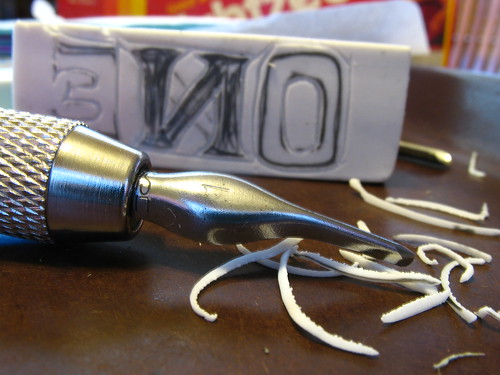
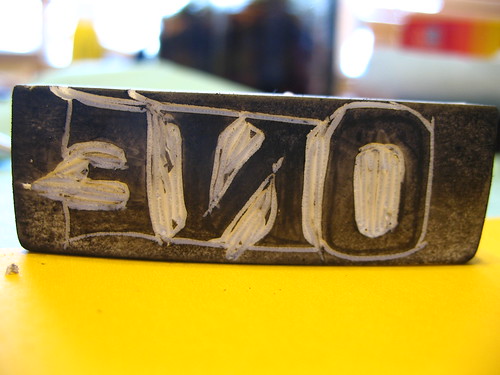
Rough carving

With outline in place, cut away! I used a Speedball Lino Set #1 that I found in a local art store (not Blick, sadly) but these erasers are so soft that you could use anything sharp enough and controllable. If you happen to have a Speedball drawing pen holder, these blades fit inside that, too, which is handy.

Except for the knife blade, all the lino tools have a U-shaped edge, in various depths and widths. This is supposedly the best way to cut stamps, versus cutting directly perpendicular to the surface, as it gives the stamp surface more strength. I stuck almost exclusively to the smallest size since these erasers are so small. And I found it easier to turn the eraser under the tool to make corners, instead of trying to hold the eraser steady and drive the cutter around. This may be horrible technique, but it worked for me. (LESSON #2)

Step 4: First Impression

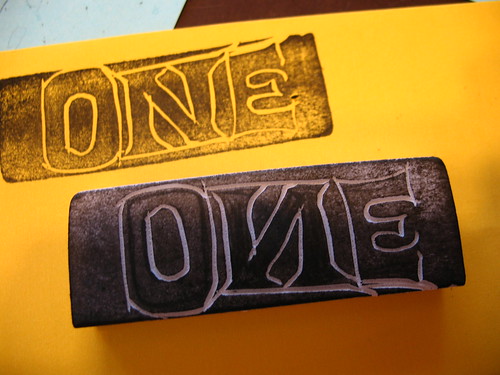
First impression

With all the outline carved out, all the handy pencil marks are theoretically gone from the surface of the eraser, and there's not enough contrast to see what's going on, at least for my middle-aged eyes. Time to break out the ink pad! Just a quick stamp to make sure everything looks OK, proportions are good, I didn't flip the "N" backwards again, etc..

Step 5: Fiddly Carving

Letter cleanout

First impression passes muster, so using the same tool ("Liner #1") I carved out the narrow spaces inside and between the letters. The leftover ink is a huge help here, since you can see what's left to do. I deliberately wanted to keep the rough-carved look for the art, so I left a lot of the excess in place. I planned to scan these and remove any problems digitally, so better to have too much "extra" stuff than not enough.

Step 6: Final Carve

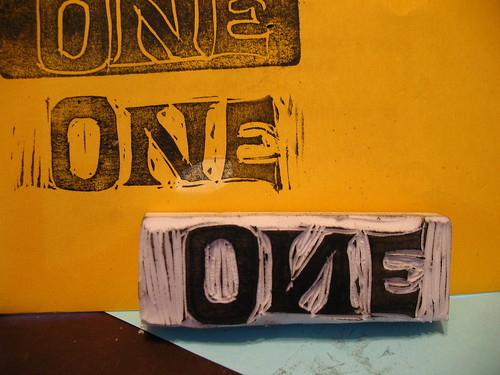
Final stamp

With the fiddly stuff done, I swapped blades and cut away all the rest of the excess. Now repeat steps 2-6 for the other two words, and then sketch up designs for the "icons" on the cover.

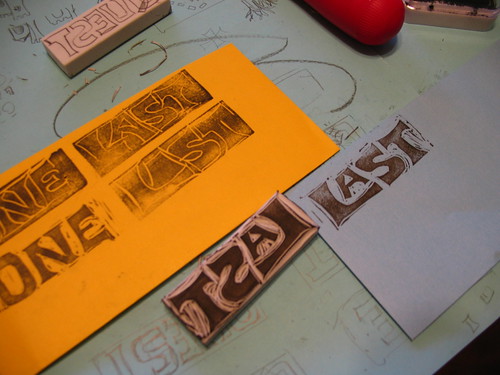
I did have trouble pinning down how I wanted the word "LAST" to look. The nice thing about using super-cheap media like dollar-store supplies is there's no real pain in tossing a bad design. Now I have an eraser I can give to my kids for schoolwork once I cut off the inky part.

Tweaking "Last"

You can see the rejected outline impression here on the orange piece of paper, and then the stamp that became the final design, with the "A" nested snug.

Step 7: Layout and Scan, and Tweak, Tweak, Tweak

The Carveningination: Aftermath

There were eight total stamps in the cover: the three words, the tower, bat, and dragon, the "X" and the source for the dotted-line path (seen just under the bat stamp above.) I did a few impressions of each stamp on a piece of plain white paper and scanned them, thinking that if I got a bad one, I could just magically copy over a good letter from another impression and drop it into place. Ha Ha! I was so naive. Here's a little tidbit I didn't think about: eraser stamps are very flexible, and they distort slightly when you press them into the page. In other words, the clean bat wings I got from impression #1 would not fit nicely over the smooth bat-body from impression #2, no matter how much I insisted that they should. Live and learn. (LESSON #3)

I brought the whole scan into Gimp and spent most of the day scooting them around a virtual page. I scaled up the words and digitally removed some of the extra print-marks and cutting goofs. The dotted-line path was made from digitally cutting up a quickie grid stamp that I made, and then laying each rectangle down individually. That felt like it took forever. I fudged the colors a bit, and with Richard Polt's permission, used his Royal Quiet Deluxe font for my name.

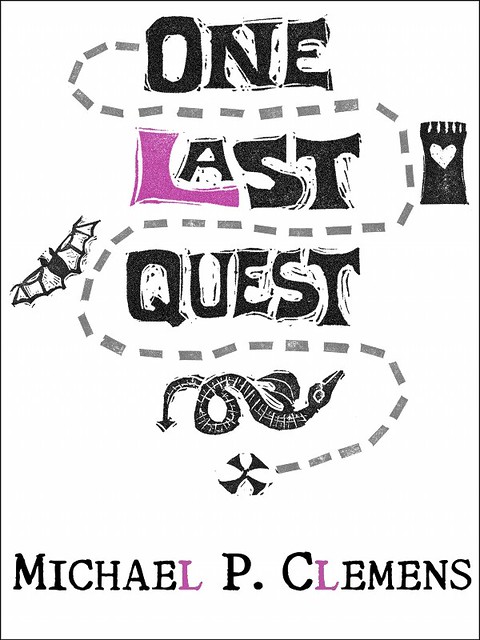
And the final result:

One Last Quest ebook cover art

I'm so pleased with the way that this turned out that I'm considering adding to the collection and doing simple interior stamp illustrations at each chapter head. But then, I've been known to pledge projects here before...

In the meantime, if you are the keeper of an electronic reading device and about a latte's worth of spare change, you, too can marvel at how spiffy this cover art looks on the screen. Oh, and there's some funny words that accompany it, too, if you're into, you know, reading.

You can get a copy of One Last Quest from Smashwords in just about every digital format, or from Barnes & Noble or Amazon if you happen to have one of their readers. All editions are DRM-free, because I'm a tree-huggin' hippie at heart.


Wednesday, February 22, 2012

An Author is Me

Kyras-Camera-High-Dive 061
"Kyras-Camera-High-Dive 061" by flickr user JoshSchulz


I spent the holiday weekend making a mess on our dining room table, and after much tweaking and pixel-pushing and fishing around for compliments, I pulled the trigger: One Last Quest is purchasable, at least electronically. That's one small step for (a) man, one more leap for the Typosphere. (Just following in Mr. Speegle's footsteps, here.) Now I sit back and recoil in horror at all the typos that slid by undetected.

One Last Quest ebook cover art
Click me for a more humorous tomorrow


Can't sit for long, though. I'm already reading through the formatting guide to upload directly to Amazon and Barnes & Noble. Formatting for Smashwords is very particular, and I hope that I can use the same file -- or a slightly tweaked version -- to handle the other two sites. And then I need to figure out if I'm going to resurrect the print version that I proofed oh-so-long ago.

The only scary part is the jump...

Monday, January 9, 2012

The Quest for Cover Art: Wisdom of the Bowker

Rob Bowker passed along a very helpful email to me, and rather than butcher it by trying to recap, I'm going to include a slightly edited version here:

BEHOLD

Here are some suggestions about what to include in a brief to an illustrator:
  • Size, especially height to width ratio
  • Layout: do you want an illustration to bleed off the edges (no margin), or just a spot illustration?
  • Colour: a black line drawing with a spot colour will be less expensive than a full colour 
  • Text area: to produce an all-over cover, the illustrator will need to know the precise positioning of the all the type - unless they are including the type as well.
  • If you are selling digital editions, the image will need to work as a smallish thumbnail.
  • Budget. An illustrator may ask for 50% down, 50% on completion. A full blown painted illustration may take a day or two, so could run to $1000 plus. You need to decide how much you can afford to spend. Remember, every time you change your mind, the meter keeps running. See above.
  • Show and tell: grab an example of something that tickles your fancy and say "like this".
Remember, there are a thousand different ways to illustrate your book - but you can only choose one. It will be a compromise. Also, it can be a bit of a roller-coaster ride and you may not end up where you thought you wanted to go - but it could still end in a perfectly good place if you treat it as a collaboration more than a simply transactional commission.

Concise and helpful, yes? I hope Rob doesn't mind me co-opting his email for what is basically a free post. I'll be sure to compensate him in whatever imaginary currency bloggers use. (I'll send you some of the Russian spammers that drop links in my comments, Rob.)

For a short while in my professional wanderings, I did happen to work for a spinoff of a printing company, so although I may not know the exact terminology, I do understand "gutter" and "bleed" and at least some of the issues of print... circa 1995 or so. Of course, the world has also changed dramatically since 1995. To wit: the company that I was working for was going to ride the Next Big Technical wave -- interactive CD-ROMs. It just so happened that I'd done some HTML, and then suddenly we found ourselves making web sites instead, with the culmination of me shaking hands with and receiving a signed mouse pad from Fabio. (Oh, the dot-com years were strange ones indeed, my friends.)

For those inclined to go the DIY route, there are certainly tools out there to simplify the process. NaNoWriMo folks get a discount on getting a proof copy printed up by CreateSpace (aka Amazon), which I've done with a much earlier draft of the book in question:


Time to Edit, or, the Proof is in the Pruning

It was done in a hurry, with a stock layout and photo on the site, but like Mr. Speegle, I have to admit to the electric thrill of holding something bound with my name on the cover. But now there's the considerations of making only what amounts to a single image, possible rendered in gray-scale on an e-ink screen as well as a full-color tablet. When the bookshelf is virtual and the "book" is palm-sized, how does the illustrator's craft adapt? I've even toyed with the idea of per-chapter illustrations a la a certain other fantasy title (cough Harry Potter cough) but then realized that honestly, the whole layout of the book is really up in the air, as you can't depend on the device. You certainly don't want any additional art to distract from the reading experience.

Frankly, the whole thing takes me back to that job in the mid-90's, trying to reduce .GIF sizes and design to accommodate 640x480 screen resolutions and to make pages AOL-friendly. I should straighten up in case Fabio comes wandering by.

Thursday, January 5, 2012

Illustrator Redux

Once again, I get to show off how little I actually know. A few things I've learned since my initial call for an illutrator:

  1. There are a lot of talented people out there
  2. I should probably not ask for help over vacation, since I'm offline most of the time, and those same talented people now probably think I'm rude/dead
  3. I'm actually only one of those things
  4. It's probably a good idea to nail down the cover illustration while your draft is being read and revised, and not after, so you don't have this nagging sense that the process has come to a crashing halt, when in fact it's just taking The Right Amount of Time
  5. There is no number 5
  6. I know nothing about how to spec illustrations, or how this process is "supposed" to work
  7. "Illustration" is a very broad term, which appears to mean "anything other than a photograph"
To everyone that's contacted me: I'm sorry I have not replied, please see point #2, above. One person is taking a swing at the cover, but as per #6, I don't know if it's standard/polite/acceptable to also ask other people to do the same, at the same time. That feels a bit unfair to me, and considering that the stakes are so low, I don't want to get anyone's hopes up. But clearly there's artsy talent out there, waiting to be tapped.

So, here's my promise to all the illustrators that I have been rude/dead to: I'm re-reading this year's NaNoWriMo draft, with the intent of digitizing the same and unleashing it on my unawares pre-readers. When that happens, I'll put out another call for a cover for that book, per #4. I can only do that, however, if I also learn what's expected of me. Illustrators, what do you need from an author?

Thursday, December 29, 2011

Illustrator Wanted

Just popping in for a moment here, before the family treks off on some mandated Togetherness Time. (Actual quote from my wife and I to kids: "We will have fun, it won't be boring, so put down the video games and get your shoes on!")

Rob Bowker correctly and kindly suggested that I need an illustrator for the vision I'm carrying around in my head for the cover of my honest-I'll-self-publish-any-day-now novel One Last Quest. Of course, I have no experience finding the same. How exactly does one find such talent these days? Craigslist posting? Comb through deviantArt? Hang out in Starbucks and Peet's and look for someone sketching? Does one even sketch any more, or is it all done with iPads these days?

If things get desperate, I can always hand the digitizing pen over to my nine-year-old daughter. At least she won't be riddled with self-doubt, and I can reimburse her in leftover Christmas cookies.